M3U playlist format explained
An M3U playlist is a text file: one header line, then a metadata line and a URL for every channel. That is nearly the whole format, and almost everything that goes wrong with a playlist sits in the small number of rules around those two lines. Where a rule does not exist, this guide says so, because much of what is published as M3U documentation describes player conventions as if they were specifications.
The header is not decoration
The first line of a valid playlist is #EXTM3U. It exists so a
player can tell a playlist from a plain list of links, and its absence is the
most common reason a file “does nothing” when opened. Some players accept a
file without it and infer the format from the extension; others refuse. Writing
the header costs seven characters and removes a whole class of failure. The HLS
branch of the format keeps the same requirement, which is why
#EXTM3U is the first line of every playlist discussed on this site.
After the header, lines beginning with # are directives and lines
that are not comments are addresses. A blank line is ignored. Nothing else is
structural: there are no closing tags, no brackets, no indentation that matters.
Directives are attached to the entry below them
A directive line describes the entry that follows it, which is why
#EXTINF sits above its URL rather than beside it. Players recognise
a handful of these: #EXTGRP for a group, #EXTVLCOPT for
VLC-specific options, #KODIPROP for Kodi. Anything unrecognised is
meant to be skipped rather than treated as an error, and that tolerance is the
format's only real compatibility promise — it is why a playlist written for one
player usually loads in another with a few features missing.
Anatomy of an #EXTINF line
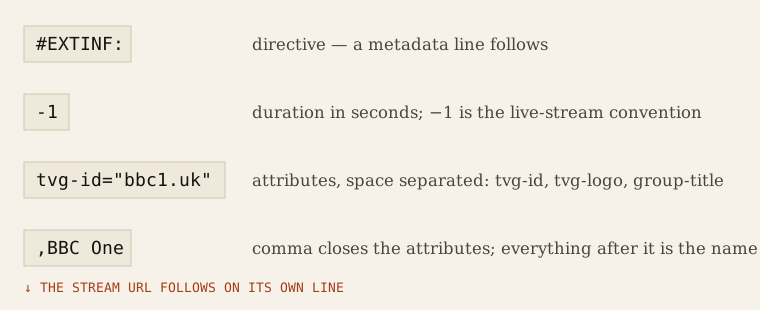
Every entry starts with #EXTINF: followed by a duration, optional
attributes, a comma and a display name. Read left to right:
#EXTINF:-1 tvg-id="bbc1.uk" group-title="News",BBC One. Each part
has a different origin and a different failure mode.
Duration
The duration comes first, before any attribute, and a player that does not find a number there may discard the entry. The values people actually see are:
| Value | What it means | Defined by |
|---|---|---|
-1 | Live stream, no fixed length. The commonest value in channel lists. | Convention only. No specification defines it. |
0 | Also used for live by some emitters, with the same intent. | Convention only. |
120 | A fixed-length item of 120 seconds. | HLS: the length of one media segment. |
9.009 | A fractional segment length. | HLS, where segment durations are rarely whole seconds. |
The -1 that appears in almost every IPTV list is a convention with
no authority behind it. In HLS, where the same #EXTINF tag is
specified, the duration is the length of a media segment and must be a number
of seconds, so a negative value has no meaning there. Players accept it because
channel-list parsing is a more forgiving code path than stream manifest parsing,
not because the format allows it. The two documents share a tag and an
extension but not a purpose — M3U vs M3U8
covers how to tell which one you are holding.
The attributes that change behaviour
Attributes are key="value" pairs separated by spaces. The ones that
are widely implemented, and what breaks when they are wrong:
| Attribute | What it does | When it is wrong |
|---|---|---|
tvg-id | Matches the entry to a channel in an EPG source. | The channel plays with no schedule, which people report as a player fault. |
tvg-name | Name used for guide matching; often a fallback display name. | The guide shows the raw name, or nothing. |
tvg-logo | Image URL for the channel tile. | An empty tile, or a broken-image icon if the URL 404s. |
group-title | The group a player files the channel under. | The channel lands in the wrong group, or in none. |
tvg-chno | A channel number, where the player shows one. | Ignored by players that do not implement it. Harmless. |
catchup, timeshift | A replay window, where the provider supports it. | Honoured only by players that implement the convention. |
These tvg-* names are not part of any specification. They are
conventions that player implementations agree on to varying degrees, which is
why one playlist can be correct and still behave differently in two
applications. group-title is the clearest example: it is an
ordinary string, so two channels share a group only when the strings match
exactly, trailing space included.
Where the name starts
The display name begins after the comma that closes the attribute list — the
first comma outside quotation marks, not the last comma on the line. That
distinction matters in both directions. A quoted value containing a comma, such
as group-title="News, World", must not end the attribute list, and
a name containing a comma, such as ,BBC One, HD, must survive
intact. Splitting on the last comma breaks the first case; splitting on the
first comma breaks neither.
An unclosed quote is the failure that follows from this rule. The attribute list never formally ends, so the attributes after the stray quote are not parsed and the entry keeps a name but loses its metadata — no group, no logo, no guide id, and no error message anywhere.
One metadata line, one URL
The line after an #EXTINF must be exactly one URL. That pairing is
the rule that matters most: a player reads the metadata, then the next
non-comment line as the address for it. Insert a second URL under one entry and
the extra address either gets ignored or becomes the location of the entry
after it, depending on how strict the player is — which is how a channel ends up
showing another channel's name.
The same pairing is the reason duplicate removal can be exact. Two entries with the same address are unambiguously the same stream, whatever their names say.
What that address may look like depends on where the playlist came from. In a file on disk it is usually absolute; inside a playlist served over HTTP it can be relative to the URL that delivered the file, which is why a list that works from one host breaks when copied to another. The playlist URL guide covers that difference, and why an address that plays in a desktop player can do nothing at all in a browser.
The faults that stop a file loading
These are the structural failures worth checking first, in the order a parser meets them:
| Symptom | Usual cause | Reported as |
|---|---|---|
| The file opens to an empty list | No #EXTM3U first line | Error: the file does not start with the header |
| One channel is missing entirely | An #EXTINF with no URL beneath it | Error: an #EXTINF is followed by another #EXTINF |
| Names appear next to the wrong streams | An extra URL under one entry | Warning: a URL appears with no entry above it |
| A channel has no group, logo or guide data | An unclosed quote in the attribute list | No message — the attributes are simply not applied |
| The list loads but the guide is empty | No tvg-id, or ids that match nothing | Warning: no entry has a tvg-id |
| The same channel appears twice | Merged exports, or a provider re-adding channels | Warning: the count of duplicate stream URLs |
| A line seems to do nothing | Text that is neither a directive, a comment nor a URL | Warning: the line will be ignored by players |
None of these are visible in a player's error message, which tends to say the file could not be parsed and nothing else. That is why validating first saves time: the validator reports the line number and the reason, using the checks in the table above. Once a file is structurally clean, the editor can rename and regroup entries without reintroducing any of them.
Two files you can check yourself
Every fault in the table above is reproducible. These two files differ only in
whether they are structurally clean, and both are safe to open: every address
points at example.com, which is reserved for documentation, so
nothing in either file can reach a real stream.
| File | What it contains | Validator result |
|---|---|---|
| valid-playlist.m3u | Five channels, all with a tvg-id: a quoted group containing a comma, a channel name containing a comma, an #EXTVLCOPT directive and one fixed-length entry. |
100/100 — 5 channels, 0 errors, 0 warnings |
| broken-playlist.m3u | Nine lines with no header, a dangling entry, an orphaned URL and one stream used twice. | 30/100 — 3 channels, 3 errors, 2 warnings |
The broken file fails in the order a parser meets it. Line 3 is an
#EXTINF followed by another #EXTINF instead of a URL.
Line 6 is a URL with no entry above it, left over from a channel that was
deleted without its address. Line 9 is the last entry, with no URL at all. The
file also has no #EXTM3U header, uses the same stream on two
channels, and contains no tvg-id anywhere — which the validator
reports as information rather than as a fault, because a playlist without guide
data still plays.
Open either file in the validator to see the report, or in the editor to watch the same three channels rebuild themselves with the header restored, the orphaned URL gone and the duplicate removed. The counts above are what the tools report on these exact files, not an illustration.
Where these rules come from
There is no formal specification for the M3U format. It is a de facto standard
that grew out of a 1990s Winamp playlist, which is why the tvg-*
attributes and the -1 duration are conventions rather than rules.
Two documents do cover parts of the picture, and both are worth reading if you
are writing a parser rather than reading a playlist:
-
RFC 8216, HTTP Live Streaming
— the standards-track description of the HLS branch, including
#EXTINF(§4.3.2.1),#EXT-X-TARGETDURATION(§4.3.3.1) and#EXT-X-STREAM-INF(§4.3.4.2). - HLS authoring specification for Apple devices — the production requirements for HLS playlists, including the playlist and multivariant-playlist sections.
- M3U — cited here only for the negative fact that governs everything above: no formal specification exists, so the extension carries the encoding convention.